A Plug and Play Applet Architecture
How I restructured Click's firmware into a decoupled system core and standalone C++ applets.
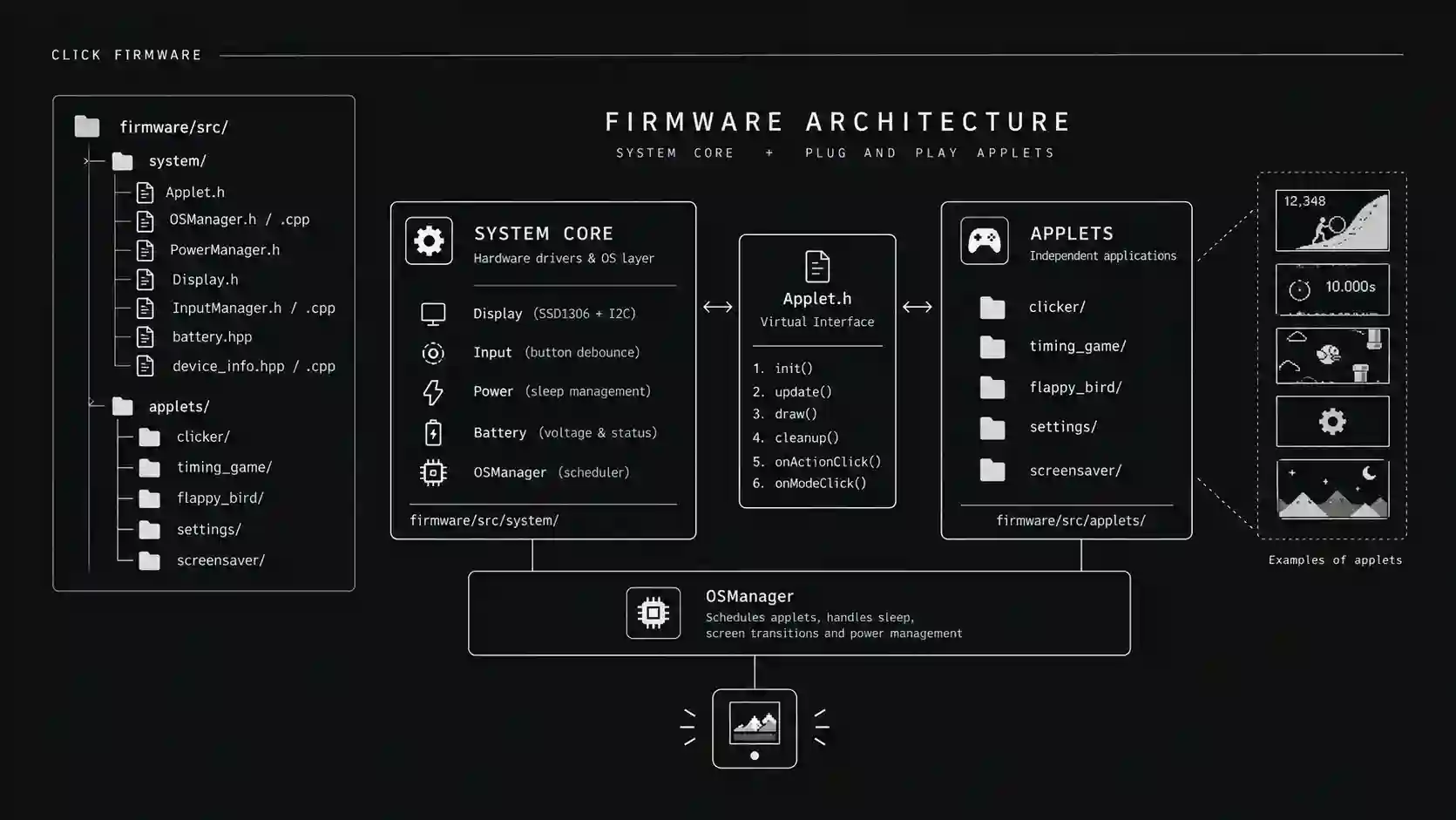
When building early firmware prototypes, it is tempting to put display routines, button handling, power management, and game logic into a single main file. As I added features like timing games and screensavers, the codebase quickly became chaotic. A bug in a mini-game could freeze the entire device, mess up button debouncing, or prevent low-power sleep mode from triggering.
To make the codebase maintainable and scalable for open-source contributors, I completely restructured the firmware into a decoupled, modular system. I split the code into two distinct layers: system core drivers located in firmware/src/system/ and standalone user applications located in firmware/src/applets/.
The System Core
The system core layer operates as a lightweight embedded operating system. It handles hardware tasks including display initialization, 400kHz fast I2C transfers, battery voltage sampling, debounced edge-detection button inputs, and light or deep sleep power management.
Higher-level applets never interact directly with low-level registers or hardware delay calls.
The Applet Interface
Every game or tool in the system implements a clean virtual C++ interface defined in Applet.h. The interface enforces five core lifecycle methods:
init is called once when the applet gains active focus to set up local variables and load saved scores from non-volatile storage.
update runs on every loop iteration to calculate non-blocking physics, timer ticks, and game state changes using millis timestamps.
draw executes after update to render bitmap frames to the OLED display buffer.
cleanup executes when I switch away from the applet, freeing temporary memory and saving persistent data.
Virtual event callbacks like onActionClick and onModeClick handle debounced button presses dispatched from the global input manager.
Adding New Applets
With this architecture, adding a new game like Floppy Bird or Just Ten requires creating a self-contained directory in firmware/src/applets/ and registering the instance in main.cpp.
The core OSManager automatically handles scheduling, screen transitions, idle screensaver triggers, and power-down sequences in the background.
Keeping Hardware and Applications Separate
By decoupling application logic from low-level power management, I can build custom games for Click without worrying about breaking system sleep modes or display drivers.
Related posts
Assembling Click V4
3 Units, 1 Battery Problem, and Handing the Code Over to the Experts.
Preparing for the RP2354A
Firmware roadmap for the RP2354A board arriving tomorrow. Remapping QFN-56 pins, non-blocking state loops, 64-bit hardware IDs, and I2C sleep recovery.
Click's Identity & the Global Leaderboard
How I connected Click's hardware identity, browser-based personalization, and a zero-cost (for now) global leaderboard.